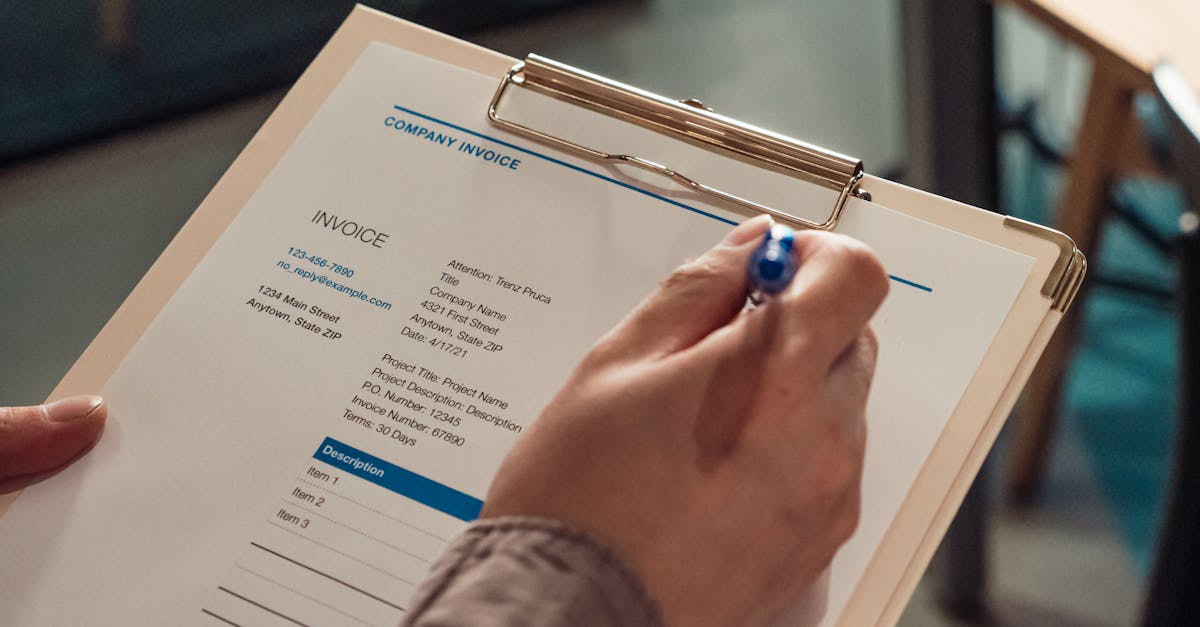
Cash flow is the lifeline of every lawn care business. You can have a full schedule, a great crew, and happy customers, but if your invoices sit unpaid for 30, 60, or 90 days, your business is in trouble. Late payments force you to cover fuel, payroll, and equipment costs out of pocket, creating financial stress that compounds with every passing week.
The root cause of slow payments is often not that customers are unwilling to pay. It is that the invoice itself is unclear, hard to find, or inconvenient to pay. A professional, well-structured invoice that arrives promptly and offers easy payment options will get paid significantly faster than a handwritten note or a vague text message asking for money. In fact, businesses that send digital invoices with online payment options get paid an average of 14 days faster than those relying on paper invoices or manual billing.
In this guide, we will cover everything you need to know about creating professional lawn care invoices, from what to include on every invoice to setting payment terms, choosing between paper and digital, and automating your entire billing workflow.
Why Professional Invoices Matter More Than You Think
Your invoice is often the last touchpoint a customer has with your business after each service visit. It is a direct reflection of your professionalism, and it shapes how customers perceive the value of your work. A clean, detailed invoice communicates that you run a serious business. A scribbled note on a receipt pad communicates the opposite.
Beyond perception, professional invoices serve several critical business functions:
- They reduce payment disputes. A clear, itemized invoice that lists exactly what services were performed, when they were performed, and what each service costs leaves very little room for misunderstanding. When a customer can see "Weekly mowing - front and back lawn - $45" alongside "Edging and trimming - $15" they know exactly what they are paying for. Vague invoices like "Lawn service - $60" invite questions and disputes that delay payment.
- They support your legal position. If you ever need to pursue a late payment through collections or small claims court, a professional invoice with clear terms, dates, and itemized charges is essential documentation. Informal billing through text messages or verbal agreements is much harder to enforce legally. Following IRS record-keeping requirements for small businesses ensures you maintain compliant documentation.
- They simplify your bookkeeping. Well-structured invoices with consistent formatting, sequential numbering, and proper categorization make tax preparation and financial reporting dramatically easier. When April rolls around, you will thank yourself for maintaining clean invoicing records throughout the year.
- They encourage recurring business. An invoice that includes a note about upcoming scheduled services or seasonal offerings keeps your business top of mind. It is a subtle marketing touchpoint that costs you nothing extra but can drive additional revenue.
What Every Lawn Care Invoice Must Include
A complete lawn care invoice should contain the following elements. Missing any of these can lead to payment delays, disputes, or bookkeeping headaches:
Your business information. Include your company name, address, phone number, email, and website at the top of every invoice. If your state requires it, include your business license number. This information establishes legitimacy and makes it easy for customers to contact you with questions.
Customer information.Include the customer's full name, service address (which may differ from their billing address), and contact information. For commercial clients, include the company name and the name of your point of contact.
Invoice number. Every invoice needs a unique number for tracking purposes. Sequential numbering (INV-001, INV-002, etc.) works well for most small businesses. Some companies use a date-based system (2026-0218-001 for the first invoice on February 18, 2026). Whatever system you choose, be consistent. Duplicate or missing invoice numbers create confusion for both you and your customers.
Invoice date and service date(s). The invoice date is when the bill is issued. The service date is when the work was actually performed. These may be the same day, or you may batch your invoicing weekly or monthly. Including both dates prevents disputes about when services were rendered and when payment became due.
Itemized service descriptions.List each service performed as a separate line item with a clear description and individual price. Do not lump everything into a single "lawn care" charge. Break it down: mowing, edging, trimming, blowing, fertilizer application, weed treatment, aeration, etc. This transparency builds trust and makes it easy for customers to understand exactly what they are paying for.
Quantities and rates.For services billed by the hour or by the square foot, show the quantity and the unit rate alongside the line item total. For flat-rate services, simply show the service and the price. This level of detail prevents questions like "Why is this bill higher than last month?" because the customer can clearly see that you performed additional services.
Subtotal, taxes, and total. Show the subtotal of all services, any applicable sales tax (which varies by state and service type), and the final total due. Clearly distinguish between these amounts so there is no ambiguity about the payment expected.
Payment terms.State when payment is due and what payment methods you accept. We will cover payment terms in detail in the next section, but at minimum your invoice should say something like "Due upon receipt" or "Net 15" along with accepted payment methods.
Late payment policy.If you charge late fees, state the policy clearly on every invoice. Something like "A late fee of 1.5% per month will be applied to balances overdue by more than 15 days" sets expectations upfront and gives you leverage to enforce timely payment.
Setting Payment Terms That Work
Payment terms define when you expect to be paid and the conditions surrounding that payment. Getting your terms right balances two competing needs: you want to get paid as quickly as possible, but you also want to make it easy and comfortable for customers to pay.
Due upon receipt is the most aggressive payment term. It means you expect payment as soon as the customer receives the invoice. This works well for one-time services, new customers, and residential clients. Most residential customers are accustomed to paying immediately for services, especially when you provide an easy digital payment option. The advantage of due-upon-receipt terms is obvious: faster cash flow. The potential downside is that some customers, particularly commercial accounts, may find this term inflexible.
Net 15 (payment due within 15 days) is the sweet spot for most lawn care businesses. It gives customers a reasonable window to process the payment without letting the invoice age long enough to be forgotten. For residential customers, 15 days is more than enough time. For commercial clients who need to route payments through an accounts payable department, Net 15 keeps your cash flow moving without creating friction.
Net 30 (payment due within 30 days) is standard in many industries but can be problematic for small lawn care companies. A month is a long time to wait for payment, especially during the busy season when your expenses are highest. If you offer Net 30 terms, you should reserve them for established commercial accounts with a strong payment history. New customers and residential accounts should be on shorter terms.
Prepayment and recurring billing.The fastest way to get paid is before the work happens. Offering customers the option to prepay for a month or season of service, often at a small discount, eliminates the invoicing cycle entirely. Alternatively, recurring billing that automatically charges a customer's card or bank account on a set schedule ensures you get paid on time every time. Many customers prefer this convenience since they do not have to remember to make a payment, and you do not have to chase them for it.
Early payment discountscan incentivize faster payment without penalizing customers. A common structure is "2% 10 Net 30," meaning the customer gets a 2% discount if they pay within 10 days, otherwise the full amount is due in 30 days. On a $200 invoice, that is a $4 discount for paying quickly. The math works heavily in your favor: getting $196 in 10 days is almost always better for your cash flow than waiting 30 or more days for $200.
Digital vs. Paper Invoices: The Case for Going Online
If you are still handing customers a paper invoice or mailing printed statements, you are leaving money on the table. Digital invoicing is faster, cheaper, more professional, and dramatically more effective at getting you paid on time.
Speed of delivery.A digital invoice arrives in your customer's email or text messages within seconds of being sent. A paper invoice requires printing, stuffing an envelope, adding a stamp, and waiting two to five business days for mail delivery. That is a week of delay before the payment clock even starts ticking. For a business that bills $8,000 per month, receiving payment even 5 days faster puts an extra $1,300 in your bank account sooner (assuming even cash distribution).
Online payment options. Digital invoices can include a "Pay Now" button that lets customers pay instantly with a credit card, debit card, or ACH bank transfer. This single feature transforms your average collection time more than any other change you can make. When paying is as easy as tapping a button on a phone, customers pay faster because there is no friction. No finding a checkbook, no remembering to mail a payment, no logging into their bank's bill pay system. One tap, and you are paid. According to Federal Reserve data on digital payment adoption, consumer preference for digital payments continues to grow year over year.
Automatic reminders. Digital invoicing systems can automatically send reminder emails or texts when an invoice is approaching its due date or has gone past due. These gentle nudges dramatically reduce the number of invoices you need to follow up on manually. Most customers who pay late do so because they simply forgot, not because they are avoiding payment. An automated reminder solves that problem without any effort from you and without the awkwardness of personally asking a customer for money.
Record keeping. Every digital invoice is automatically saved and organized in your invoicing system. You can search by customer, date, amount, or status (paid, unpaid, overdue) instantly. Compare this to a shoebox of paper invoice copies and bank deposit slips, and the efficiency difference is staggering. Come tax season, your accountant will appreciate having clean, digital records rather than a pile of crumpled paperwork.
Cost savings. Paper, envelopes, stamps, and printer ink add up. A lawn care company sending 100 invoices per month spends roughly $70 to $100 on printing and mailing costs alone. Over a year, that is $840 to $1,200 that could be eliminated entirely by switching to digital invoicing.
Automating Your Invoicing Workflow
The ultimate efficiency upgrade for lawn care invoicing is automation. Instead of manually creating, sending, and tracking each invoice, invoicing software handles the entire process for you. Here is what a fully automated invoicing workflow looks like:
Step 1: Service completion triggers the invoice.When your crew marks a job as complete in the field, the system automatically generates an invoice based on the services performed and the customer's contracted rates. No manual data entry, no remembering to send a bill. The invoice is created the moment the work is done.
Step 2: Automatic delivery. The invoice is sent to the customer via their preferred method, whether that is email, text message, or both, within minutes of the job being completed. Some customers arrive home from work to find their lawn freshly mowed and the invoice already in their inbox. That immediacy drives faster payment.
Step 3: Online payment processing.The customer taps "Pay Now" on the invoice and pays with their card or bank account. The payment is processed, a receipt is generated automatically, and the invoice is marked as paid in your system. You do not have to touch anything.
Step 4: Automatic reminders for unpaid invoices. If the customer does not pay within your specified timeframe, the system sends a friendly reminder. You can configure the timing and frequency of reminders: perhaps a gentle nudge at 7 days, a firmer reminder at 14 days, and a final notice at 30 days. Each reminder includes the payment link for maximum convenience.
Step 5: Recurring invoicing for regular customers.For customers on weekly or biweekly mowing schedules, you can set up recurring invoices that generate and send automatically on a set schedule. The customer receives the same invoice on the same day each billing cycle without you lifting a finger. Even better, combine recurring invoicing with autopay so the customer's card is charged automatically, eliminating the payment cycle entirely.
GreenRoute's invoicing system is built specifically for lawn care businesses and supports this entire automated workflow. Invoices are generated from completed jobs with accurate service details, sent via email or text with a one-tap payment link, and tracked automatically with configurable reminders. The system supports recurring invoicing, multiple payment methods including credit card, Apple Pay, and Google Pay (with cash, checks, Zelle, Venmo, CashApp, and PayPal tracking on paid plans), and integrates with your customer records and scheduling so everything stays in sync.
The best part is that GreenRoute's invoicing is available on the free Starter plan with no limits on the number of invoices you can send. There are no per-invoice fees and no per-user fees. You can send your first professional, digital invoice today without spending a cent.
Professional invoicing is not about being fancy. It is about being clear, consistent, and convenient. When your invoices clearly communicate what was done, how much it costs, and how to pay, customers respond by paying faster and with fewer questions. When you automate the process, you reclaim hours each week that you can spend on billable work instead of chasing payments. The lawn care companies that master invoicing do not just get paid faster. They build stronger customer relationships, maintain healthier cash flow, and ultimately grow more profitable businesses.